You can choose how to store your models. You can store them locally on your computer, you can use the Model Repository Manager to store TALPAC 3D models. Benefits of using the Model Repository Manager include:
Each time that a model is checked in to the model repository, a copy of the model is saved on the server. You can save old models if required.
You are always shown the current version of the model that you are working on, ensuring that there is always a single source of the truth.
When looking for models in the Model Repository Manager, as well as storing the models by location, you can search across a range of metadata to find the model that you are looking for.
When you open the model repository manager, you will see a map of the world. When models are stored, they are stored at a location. You can see models that you have created and template models.
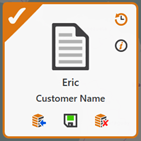
To help you manage how many models you currently have checked out, an indicator shows on folders that contain checked out models. When viewed in the model repository manager, checked out models are solid and have a tick in the top left corner.
The options available to you when you select a checked out model include check in, download a copy and cancel check out.
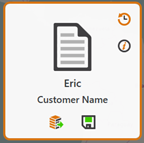
When viewed in the Model Repository Manager, a checked in model is solid, with no tick.
The options available when you select a checked in model include check out and download a copy.